Extraction
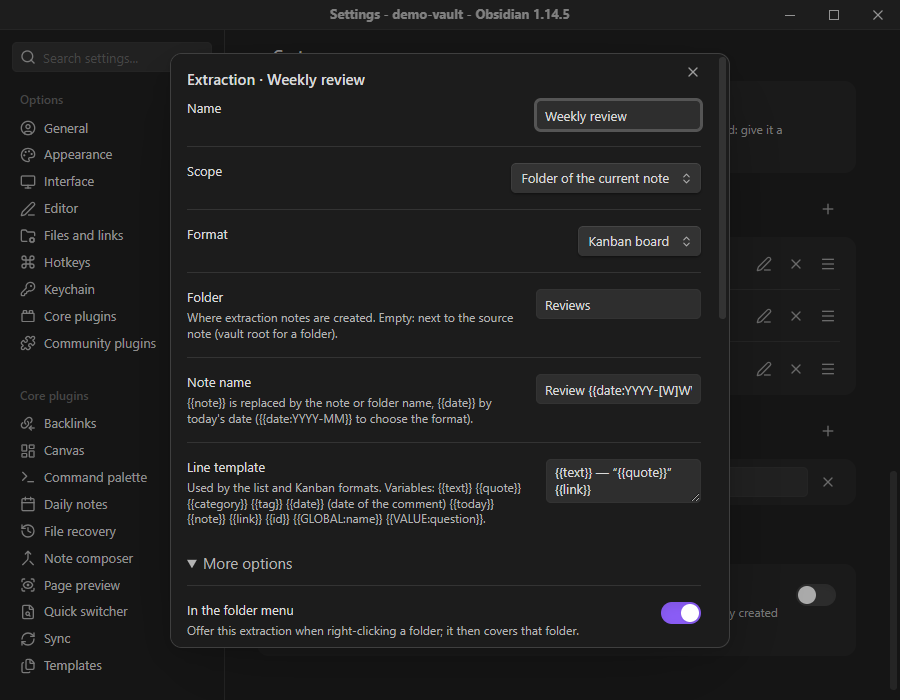
An extraction copies comments into a separate note. Each comment ends with a ↩ link that reopens the source note and selects the passage. An extraction note is a copy: editing it does not change the comments in the source note.
The default extraction
Section titled “The default extraction”The command Extract comments from this note (hypomnema:extract-note), or a right-click on a folder → Extract comments from this folder, runs the default extraction. It belongs to level 1 and is set in the Extraction section of Settings → Hypomnema:
| Setting | Effect |
|---|---|
| Format | List by category, Table, or Kanban board (one column per category, plus a Done column). |
| Folder | Where extraction notes are created. Empty: next to the source note (vault root for a folder). |
| Note name | {{note}} is replaced by the note or folder name, {{date}} by today’s date. Default: {{note}} — comments. |
| Line template | Used by the list and Kanban formats. Default: {{text}} — “{{quote}}” {{link}}. |
| Include replies | Adds the replies under each comment. |
| If the note already exists | Add only new comments (default) keeps your changes; Replace it rewrites the note. |
In Add only new comments mode, the ↩ link identifies each comment: one whose link is already in the note is skipped, wherever you moved it. Cards you moved or ticked stay where they are.
The note carries the properties hypomnema-extract, hypomnema-source and hypomnema-date, plus the category tags, so Dataview finds it.
From version 0.5.0, the default extraction stays simply Extraction, in the level-1 section. It cannot be deleted, so extract-note always works, and it does not appear in the gesture list. Its extra options, the category filter, Active since, Template note and Run Templater, sit behind the More options button of the Extraction section. From a command it works on the current note; from a folder’s menu, on the clicked folder.
Named extractions
Section titled “Named extractions”An Extraction gesture has the same settings as the default extraction, plus a scope, a filter and an optional template. A new named extraction starts with the scope Current note.
interface ExtractionGeste extends GesteBase { kind: "extraction"; scope: "context" | "note" | "folder-current" | "folder" | "vault"; folderMenu: boolean; folderPath?: string; filter: { categories: string[]; since?: string; includeReplies: boolean }; format: "list" | "table" | "kanban"; folder: string; fileName: string; lineTemplate: string; template?: string; onExisting: "append-new" | "replace";}| Scope | Value | Meaning |
|---|---|---|
| Current note | note |
The active note. |
| Current note, or the folder right-clicked | context |
The active note from a command or a chain, the folder from a folder’s menu. |
| Folder of the current note | folder-current |
The folder that holds the active note. |
| A given folder | folder |
A fixed folder (folderPath). |
| Whole vault | vault |
Every note of the vault. |
When In the folder menu (folderMenu, under More options in the gesture form) is on, the extraction appears in the right-click menu of folders, next to the default extraction. Run from that menu, it works on the clicked folder, whatever its scope.
Filter
Section titled “Filter”Categories keeps only comments of the listed categories; empty keeps them all. Include replies adds the replies.
Active since keeps a thread whose most recent date, root or reply, is later than the threshold. A thread revived by a new reply therefore comes back into the review. The threshold is either a date (2026-10-01) or a relative date such as {{date-7d}}, always counted from today.
Templater
Section titled “Templater”If the Templater plugin is enabled, the Run Templater toggle under More options passes the new note to Templater, which then runs the <% … %> tags of the template. It is off by default and only shown when Templater is enabled. See Templater.