Gestures
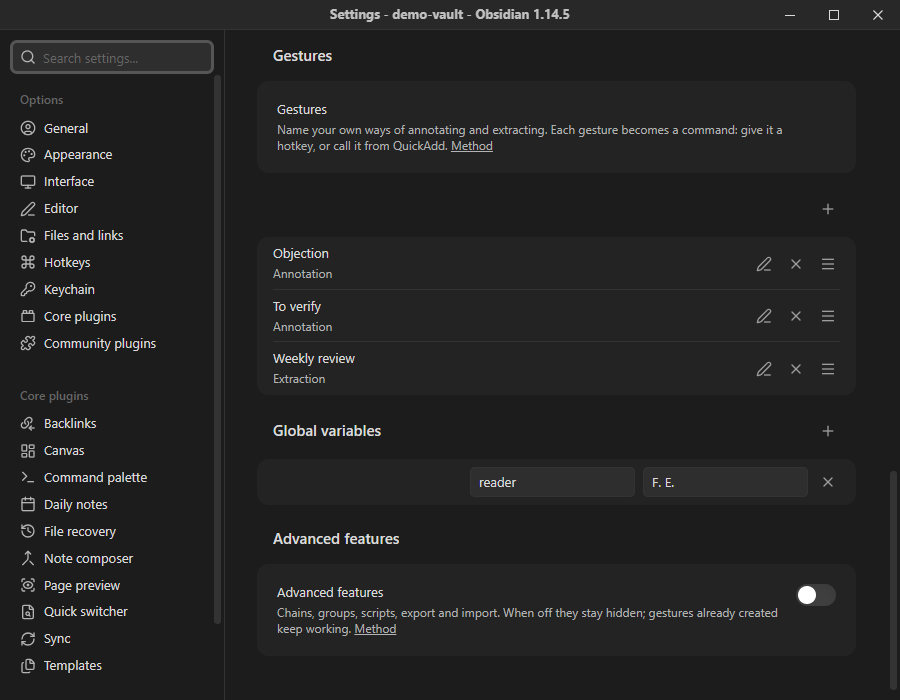
A gesture is a reading action you define yourself, give a name to, and run as an Obsidian command. It can be a way of annotating, a way of extracting, or a sequence of both. Without any gesture defined, the plugin behaves exactly as before: gestures are an addition, never a prerequisite.
The four kinds
Section titled “The four kinds”| Kind | Level | What it does |
|---|---|---|
| Annotation | 2 | Comments with a preset category and starting text. |
| Extraction | 2 | Extracts comments according to a scope, a filter, a format and a template. |
| Chain | 3 | Runs a sequence of steps: gestures, commands, scripts, pauses. |
| Group | 3 | Opens a menu that lists other gestures. |
Chains and groups only appear in the settings when Advanced features is on. Gestures of those kinds that already exist keep running when the switch is off.
What every gesture has
Section titled “What every gesture has”interface GesteBase { id: string; // stable, generated at creation name: string; kind: "annotation" | "extraction" | "chain" | "group"; command: boolean; // exposed as an Obsidian command}When the Command toggle is on, the gesture becomes the command hypomnema:geste-<id>. You can then give it a hotkey, find it in the command palette, call it from a QuickAdd macro (Obsidian command step) or launch it through the URI. Adding or deleting a gesture adds or removes its command at once, without restarting Obsidian.
The command Run a gesture (hypomnema:run-geste) lists every gesture in a searchable menu, whether or not it has its own command. It is available as soon as at least one gesture exists.
Where gestures live
Section titled “Where gestures live”The Gestures section of Settings → Hypomnema lists them with their name, kind and Command toggle, and buttons to move, edit or delete each one. Add a gesture opens a short form: a name, a kind, then only the fields that kind needs. Optional fields are folded under More options. The Global variables section, just below, holds the global variables.
Coming from QuickAdd
Section titled “Coming from QuickAdd”Hypomnema borrows QuickAdd’s vocabulary of choices, but applies it to annotation only.
| QuickAdd | Hypomnema | Level |
|---|---|---|
| Choice | Gesture | 2 |
| Capture | Annotation | 2 |
| Template | Extraction | 2 |
| Format syntax | Variable syntax | 2 |
| Global variables | Global variables | 2 |
| Template file | Template | 2 |
| Macro | Chain | 3 |
| Multi | Group | 3 |
| User scripts | Script | 3 |
| API | Public API | 3 |
| Obsidian URI | URI obsidian://hypomnema?geste=… |
3 |
| Packages | Export / import | 3 |
There is no AI assistant: a comment is always written by the reader.